April 2025
148 posts: 12 entries, 50 links, 26 quotes, 12 notes, 48 beats
April 12, 2025
Slopsquatting -- when an LLM hallucinates a non-existent package name, and a bad actor registers it maliciously. The AI brother of typosquatting.
Credit to @sethmlarson for the name
April 13, 2025
Stevens: a hackable AI assistant using a single SQLite table and a handful of cron jobs. Geoffrey Litt reports on Stevens, a shared digital assistant he put together for his family using SQLite and scheduled tasks running on Val Town.
The design is refreshingly simple considering how much it can do. Everything works around a single memories table. A memory has text, tags, creation metadata and an optional date for things like calendar entries and weather reports.
Everything else is handled by scheduled jobs to popular weather information and events from Google Calendar, a Telegram integration offering a chat UI and a neat system where USPS postal email delivery notifications are run through Val's own email handling mechanism to trigger a Claude prompt to add those as memories too.
Here's the full code on Val Town, including the daily briefing prompt that incorporates most of the personality of the bot.
April 14, 2025
Using LLMs as the first line of support in Open Source (via) From reading the title I was nervous that this might involve automating the initial response to a user support query in an issue tracker with an LLM, but Carlton Gibson has better taste than that.
The open contribution model engendered by GitHub — where anonymous (to the project) users can create issues, and comments, which are almost always extractive support requests — results in an effective denial-of-service attack against maintainers. [...]
For anonymous users, who really just want help almost all the time, the pattern I’m settling on is to facilitate them getting their answer from their LLM of choice. [...] we can generate a file that we offer users to download, then we tell the user to pass this to (say) Claude with a simple prompt for their question.
This resonates with the concept proposed by llms.txt - making LLM-friendly context files available for different projects.
My simonw/docs-for-llms contains my own early experiment with this: I'm running a build script to create LLM-friendly concatenated documentation for several of my projects, and my llm-docs plugin (described here) can then be used to ask questions of that documentation.
It's possible to pre-populate the Claude UI with a prompt by linking to https://claude.ai/new?q={PLACE_HOLDER}, but it looks like there's quite a short length limit on how much text can be passed that way. It would be neat if you could pass a URL to a larger document instead.
ChatGPT also supports https://chatgpt.com/?q=your-prompt-here (again with a short length limit) and directly executes the prompt rather than waiting for you to edit it first(!)
SQLite File Format Viewer (via) Neat browser-based visual interface for exploring the structure of a SQLite database file, built by Visal In using React and a custom parser implemented in TypeScript.
Believing AI vendors who promise you that they won't train on your data is a huge competitive advantage these days.
GPT-4.1: Three new million token input models from OpenAI, including their cheapest model yet

OpenAI introduced three new models this morning: GPT-4.1, GPT-4.1 mini and GPT-4.1 nano. These are API-only models right now, not available through the ChatGPT interface (though you can try them out in OpenAI’s API playground). All three models can handle 1,047,576 tokens of input and 32,768 tokens of output, and all three have a May 31, 2024 cut-off date (their previous models were mostly September 2023).
[... 1,124 words]April 15, 2025
The single most impactful investment I’ve seen AI teams make isn’t a fancy evaluation dashboard—it’s building a customized interface that lets anyone examine what their AI is actually doing. I emphasize customized because every domain has unique needs that off-the-shelf tools rarely address. When reviewing apartment leasing conversations, you need to see the full chat history and scheduling context. For real-estate queries, you need the property details and source documents right there. Even small UX decisions—like where to place metadata or which filters to expose—can make the difference between a tool people actually use and one they avoid. [...]
Teams with thoughtfully designed data viewers iterate 10x faster than those without them. And here’s the thing: These tools can be built in hours using AI-assisted development (like Cursor or Loveable). The investment is minimal compared to the returns.
— Hamel Husain, A Field Guide to Rapidly Improving AI Products
April 16, 2025
openai/codex. Just released by OpenAI, a "lightweight coding agent that runs in your terminal". Looks like their version of Claude Code, though unlike Claude Code Codex is released under an open source (Apache 2) license.
Here's the main prompt that runs in a loop, which starts like this:
You are operating as and within the Codex CLI, a terminal-based agentic coding assistant built by OpenAI. It wraps OpenAI models to enable natural language interaction with a local codebase. You are expected to be precise, safe, and helpful.
You can:
- Receive user prompts, project context, and files.
- Stream responses and emit function calls (e.g., shell commands, code edits).
- Apply patches, run commands, and manage user approvals based on policy.
- Work inside a sandboxed, git-backed workspace with rollback support.
- Log telemetry so sessions can be replayed or inspected later.
- More details on your functionality are available at codex --help
The Codex CLI is open-sourced. Don't confuse yourself with the old Codex language model built by OpenAI many moons ago (this is understandably top of mind for you!). Within this context, Codex refers to the open-source agentic coding interface. [...]
I like that the prompt describes OpenAI's previous Codex language model as being from "many moons ago". Prompt engineering is so weird.
Since the prompt says that it works "inside a sandboxed, git-backed workspace" I went looking for the sandbox. On macOS it uses the little-known sandbox-exec process, part of the OS but grossly under-documented. The best information I've found about it is this article from 2020, which notes that man sandbox-exec lists it as deprecated. I didn't spot evidence in the Codex code of sandboxes for other platforms.
Introducing OpenAI o3 and o4-mini. OpenAI are really emphasizing tool use with these:
For the first time, our reasoning models can agentically use and combine every tool within ChatGPT—this includes searching the web, analyzing uploaded files and other data with Python, reasoning deeply about visual inputs, and even generating images. Critically, these models are trained to reason about when and how to use tools to produce detailed and thoughtful answers in the right output formats, typically in under a minute, to solve more complex problems.
I released llm-openai-plugin 0.3 adding support for the two new models:
llm install -U llm-openai-plugin
llm -m openai/o3 "say hi in five languages"
llm -m openai/o4-mini "say hi in five languages"
Here are the pelicans riding bicycles (prompt: Generate an SVG of a pelican riding a bicycle).
o3:

o4-mini:

Here are the full OpenAI model listings: o3 is $10/million input and $40/million for output, with a 75% discount on cached input tokens, 200,000 token context window, 100,000 max output tokens and a May 31st 2024 training cut-off (same as the GPT-4.1 models). It's a bit cheaper than o1 ($15/$60) and a lot cheaper than o1-pro ($150/$600).
o4-mini is priced the same as o3-mini: $1.10/million for input and $4.40/million for output, also with a 75% input caching discount. The size limits and training cut-off are the same as o3.
You can compare these prices with other models using the table on my updated LLM pricing calculator.
A new capability released today is that the OpenAI API can now optionally return reasoning summary text. I've been exploring that in this issue. I believe you have to verify your organization (which may involve a photo ID) in order to use this option - once you have access the easiest way to see the new tokens is using curl like this:
curl https://api.openai.com/v1/responses \
  -H "Content-Type: application/json" \
  -H "Authorization: Bearer $(llm keys get openai)" \
  -d '{
    "model": "o3",
    "input": "why is the sky blue?",
    "reasoning": {"summary": "auto"},
    "stream": true
  }'
This produces a stream of events that includes this new event type:
event: response.reasoning_summary_text.delta
data: {"type": "response.reasoning_summary_text.delta","item_id": "rs_68004320496081918e1e75ddb550d56e0e9a94ce520f0206","output_index": 0,"summary_index": 0,"delta": "**Expl"}
Omit the "stream": true and the response is easier to read and contains this:
{
  "output": [
    {
      "id": "rs_68004edd2150819183789a867a9de671069bc0c439268c95",
      "type": "reasoning",
      "summary": [
        {
          "type": "summary_text",
          "text": "**Explaining the blue sky**\n\nThe user asks a classic question about why the sky is blue. I'll talk about Rayleigh scattering, where shorter wavelengths of light scatter more than longer ones. This explains how we see blue light spread across the sky! I wonder if the user wants a more scientific or simpler everyday explanation. I'll aim for a straightforward response while keeping it engaging and informative. So, let's break it down!"
        }
      ]
    },
    {
      "id": "msg_68004edf9f5c819188a71a2c40fb9265069bc0c439268c95",
      "type": "message",
      "status": "completed",
      "content": [
        {
          "type": "output_text",
          "annotations": [],
          "text": "The short answer ..."
        }
      ]
    }
  ]
}
I work for OpenAI. [...] o4-mini is actually a considerably better vision model than o3, despite the benchmarks. Similar to how o3-mini-high was a much better coding model than o1. I would recommend using o4-mini-high over o3 for any task involving vision.
— James Betker, OpenAI
April 17, 2025
Our hypothesis is that o4-mini is a much better model, but we'll wait to hear feedback from developers. Evals only tell part of the story, and we wouldn't want to prematurely deprecate a model that developers continue to find value in. Model behavior is extremely high dimensional, and it's impossible to prevent regression on 100% use cases/prompts, especially if those prompts were originally tuned to the quirks of the older model. But if the majority of developers migrate happily, then it may make sense to deprecate at some future point.
We generally want to give developers as stable as an experience as possible, and not force them to swap models every few months whether they want to or not.
— Ted Sanders, OpenAI, on deprecating o3-mini
We (Jon and Zach) teamed up with the Harris Poll to confirm this finding and extend it. We conducted a nationally representative survey of 1,006 Gen Z young adults (ages 18-27). We asked respondents to tell us, for various platforms and products, if they wished that it “was never invented.” For Netflix, Youtube, and the internet itself, relatively few said yes to that question (always under 20%). We found much higher levels of regret for the dominant social media platforms: Instagram (34%), Facebook (37%), Snapchat (43%), and the most regretted platforms of all: TikTok (47%) and X/Twitter (50%).
— Jon Haidt and Zach Rausch, TikTok Is Harming Children at an Industrial Scale
Start building with Gemini 2.5 Flash
(via)
Google Gemini's latest model is Gemini 2.5 Flash, available in (paid) preview as gemini-2.5-flash-preview-04-17.
Building upon the popular foundation of 2.0 Flash, this new version delivers a major upgrade in reasoning capabilities, while still prioritizing speed and cost. Gemini 2.5 Flash is our first fully hybrid reasoning model, giving developers the ability to turn thinking on or off. The model also allows developers to set thinking budgets to find the right tradeoff between quality, cost, and latency.
Gemini AI Studio product lead Logan Kilpatrick says:
This is an early version of 2.5 Flash, but it already shows huge gains over 2.0 Flash.
You can fully turn off thinking if needed and use this model as a drop in replacement for 2.0 Flash.
I added support to the new model in llm-gemini 0.18. Here's how to try it out:
llm install -U llm-gemini
llm -m gemini-2.5-flash-preview-04-17 'Generate an SVG of a pelican riding a bicycle'
Here's that first pelican, using the default setting where Gemini Flash 2.5 makes its own decision in terms of how much "thinking" effort to apply:

Here's the transcript. This one used 11 input tokens, 4,266 output tokens and 2,702 "thinking" tokens.
I asked the model to "describe" that image and it could tell it was meant to be a pelican:
A simple illustration on a white background shows a stylized pelican riding a bicycle. The pelican is predominantly grey with a black eye and a prominent pink beak pouch. It is positioned on a black line-drawn bicycle with two wheels, a frame, handlebars, and pedals.
The way the model is priced is a little complicated. If you have thinking enabled, you get charged $0.15/million tokens for input and $3.50/million for output. With thinking disabled those output tokens drop to $0.60/million. I've added these to my pricing calculator.
For comparison, Gemini 2.0 Flash is $0.10/million input and $0.40/million for output.
So my first prompt - 11 input and 4,266+2,702 =6,968 output (with thinking enabled), cost 2.439 cents.
Let's try 2.5 Flash again with thinking disabled:
llm -m gemini-2.5-flash-preview-04-17 'Generate an SVG of a pelican riding a bicycle' -o thinking_budget 0

11 input, 1705 output. That's 0.1025 cents. Transcript here - it still shows 25 thinking tokens even though I set the thinking budget to 0 - Logan confirms that this will still be billed at the lower rate:
In some rare cases, the model still thinks a little even with thinking budget = 0, we are hoping to fix this before we make this model stable and you won't be billed for thinking. The thinking budget = 0 is what triggers the billing switch.
Here's Gemini 2.5 Flash's self-description of that image:
A minimalist illustration shows a bright yellow bird riding a bicycle. The bird has a simple round body, small wings, a black eye, and an open orange beak. It sits atop a simple black bicycle frame with two large circular black wheels. The bicycle also has black handlebars and black and yellow pedals. The scene is set against a solid light blue background with a thick green stripe along the bottom, suggesting grass or ground.
And finally, let's ramp the thinking budget up to the maximum:
llm -m gemini-2.5-flash-preview-04-17 'Generate an SVG of a pelican riding a bicycle' -o thinking_budget 24576

I think it over-thought this one. Transcript - 5,174 output tokens and 3,023 thinking tokens. A hefty 2.8691 cents!
A simple, cartoon-style drawing shows a bird-like figure riding a bicycle. The figure has a round gray head with a black eye and a large, flat orange beak with a yellow stripe on top. Its body is represented by a curved light gray shape extending from the head to a smaller gray shape representing the torso or rear. It has simple orange stick legs with round feet or connections at the pedals. The figure is bent forward over the handlebars in a cycling position. The bicycle is drawn with thick black outlines and has two large wheels, a frame, and pedals connected to the orange legs. The background is plain white, with a dark gray line at the bottom representing the ground.
One thing I really appreciate about Gemini 2.5 Flash's approach to SVGs is that it shows very good taste in CSS, comments and general SVG class structure. Here's a truncated extract - I run a lot of these SVG tests against different models and this one has a coding style that I particularly enjoy. (Gemini 2.5 Pro does this too).
<svg width="800" height="500" viewBox="0 0 800 500" xmlns="http://www.w3.org/2000/svg">
  <style>
    .bike-frame { fill: none; stroke: #333; stroke-width: 8; stroke-linecap: round; stroke-linejoin: round; }
    .wheel-rim { fill: none; stroke: #333; stroke-width: 8; }
    .wheel-hub { fill: #333; }
    /* ... */
    .pelican-body { fill: #d3d3d3; stroke: black; stroke-width: 3; }
    .pelican-head { fill: #d3d3d3; stroke: black; stroke-width: 3; }
    /* ... */
  </style>
  <!-- Ground Line -->
  <line x1="0" y1="480" x2="800" y2="480" stroke="#555" stroke-width="5"/>
  <!-- Bicycle -->
  <g id="bicycle">
    <!-- Wheels -->
    <circle class="wheel-rim" cx="250" cy="400" r="70"/>
    <circle class="wheel-hub" cx="250" cy="400" r="10"/>
    <circle class="wheel-rim" cx="550" cy="400" r="70"/>
    <circle class="wheel-hub" cx="550" cy="400" r="10"/>
    <!-- ... -->
  </g>
  <!-- Pelican -->
  <g id="pelican">
    <!-- Body -->
    <path class="pelican-body" d="M 440 330 C 480 280 520 280 500 350 C 480 380 420 380 440 330 Z"/>
    <!-- Neck -->
    <path class="pelican-neck" d="M 460 320 Q 380 200 300 270"/>
    <!-- Head -->
    <circle class="pelican-head" cx="300" cy="270" r="35"/>
    <!-- ... -->
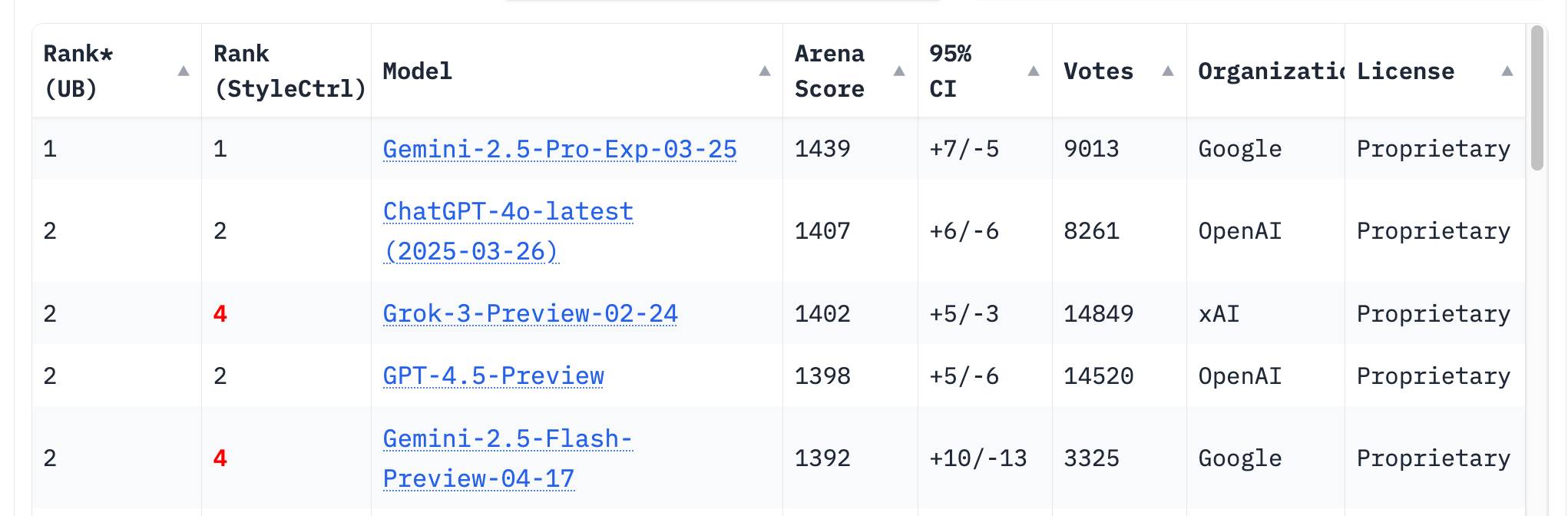
The LM Arena leaderboard now has Gemini 2.5 Flash in joint second place, just behind Gemini 2.5 Pro and tied with ChatGPT-4o-latest, Grok-3 and GPT-4.5 Preview.
April 18, 2025
MCP Run Python (via) Pydantic AI's MCP server for running LLM-generated Python code in a sandbox. They ended up using a trick I explored two years ago: using a Deno process to run Pyodide in a WebAssembly sandbox.
Here's a bit of a wild trick: since Deno loads code on-demand from JSR, and uv run can install Python dependencies on demand via the --with option... here's a one-liner you can paste into a macOS shell (provided you have Deno and uv installed already) which will run the example from their README - calculating the number of days between two dates in the most complex way imaginable:
ANTHROPIC_API_KEY="sk-ant-..." \
uv run --with pydantic-ai python -c '
import asyncio
from pydantic_ai import Agent
from pydantic_ai.mcp import MCPServerStdio

server = MCPServerStdio(
    "deno",
    args=[
        "run",
        "-N",
        "-R=node_modules",
        "-W=node_modules",
        "--node-modules-dir=auto",
        "jsr:@pydantic/mcp-run-python",
        "stdio",
    ],
)
agent = Agent("claude-3-5-haiku-latest", mcp_servers=[server])

async def main():
    async with agent.run_mcp_servers():
        result = await agent.run("How many days between 2000-01-01 and 2025-03-18?")
    print(result.output)

asyncio.run(main())'
I ran that just now and got:
The number of days between January 1st, 2000 and March 18th, 2025 is 9,208 days.
I thoroughly enjoy how tools like uv and Deno enable throwing together shell one-liner demos like this one.
Here's an extended version of this example which adds pretty-printed logging of the messages exchanged with the LLM to illustrate exactly what happened. The most important piece is this tool call where Claude 3.5 Haiku asks for Python code to be executed my the MCP server:
ToolCallPart(
    tool_name='run_python_code',
    args={
        'python_code': (
            'from datetime import date\n'
            '\n'
            'date1 = date(2000, 1, 1)\n'
            'date2 = date(2025, 3, 18)\n'
            '\n'
            'days_between = (date2 - date1).days\n'
            'print(f"Number of days between {date1} and {date2}: {days_between}")'
        ),
    },
    tool_call_id='toolu_01TXXnQ5mC4ry42DrM1jPaza',
    part_kind='tool-call',
)
I also managed to run it against Mistral Small 3.1 (15GB) running locally using Ollama (I had to add "Use your python tool" to the prompt to get it to work):
ollama pull mistral-small3.1:24b

uv run --with devtools --with pydantic-ai python -c '
import asyncio
from devtools import pprint
from pydantic_ai import Agent, capture_run_messages
from pydantic_ai.models.openai import OpenAIModel
from pydantic_ai.providers.openai import OpenAIProvider
from pydantic_ai.mcp import MCPServerStdio

server = MCPServerStdio(
    "deno",
    args=[
        "run",
        "-N",
        "-R=node_modules",
        "-W=node_modules",
        "--node-modules-dir=auto",
        "jsr:@pydantic/mcp-run-python",
        "stdio",
    ],
)

agent = Agent(
    OpenAIModel(
        model_name="mistral-small3.1:latest",
        provider=OpenAIProvider(base_url="http://localhost:11434/v1"),
    ),
    mcp_servers=[server],
)

async def main():
    with capture_run_messages() as messages:
        async with agent.run_mcp_servers():
            result = await agent.run("How many days between 2000-01-01 and 2025-03-18? Use your python tool.")
    pprint(messages)
    print(result.output)

asyncio.run(main())'
Here's the full output including the debug logs.
Image segmentation using Gemini 2.5

Max Woolf pointed out this new feature of the Gemini 2.5 series (here’s my coverage of 2.5 Pro and 2.5 Flash) in a comment on Hacker News:
[... 1,428 words]To me, a successful eval meets the following criteria. Say, we currently have system A, and we might tweak it to get a system B:
- If A works significantly better than B according to a skilled human judge, the eval should give A a significantly higher score than B.
- If A and B have similar performance, their eval scores should be similar.
Whenever a pair of systems A and B contradicts these criteria, that is a sign the eval is in “error” and we should tweak it to make it rank A and B correctly.
It frustrates me when support sites for online services fail to link to the things they are talking about. Cloudflare's Find zone and account IDs page for example provides a four step process for finding my account ID that starts at the root of their dashboard, including a screenshot of where I should click.
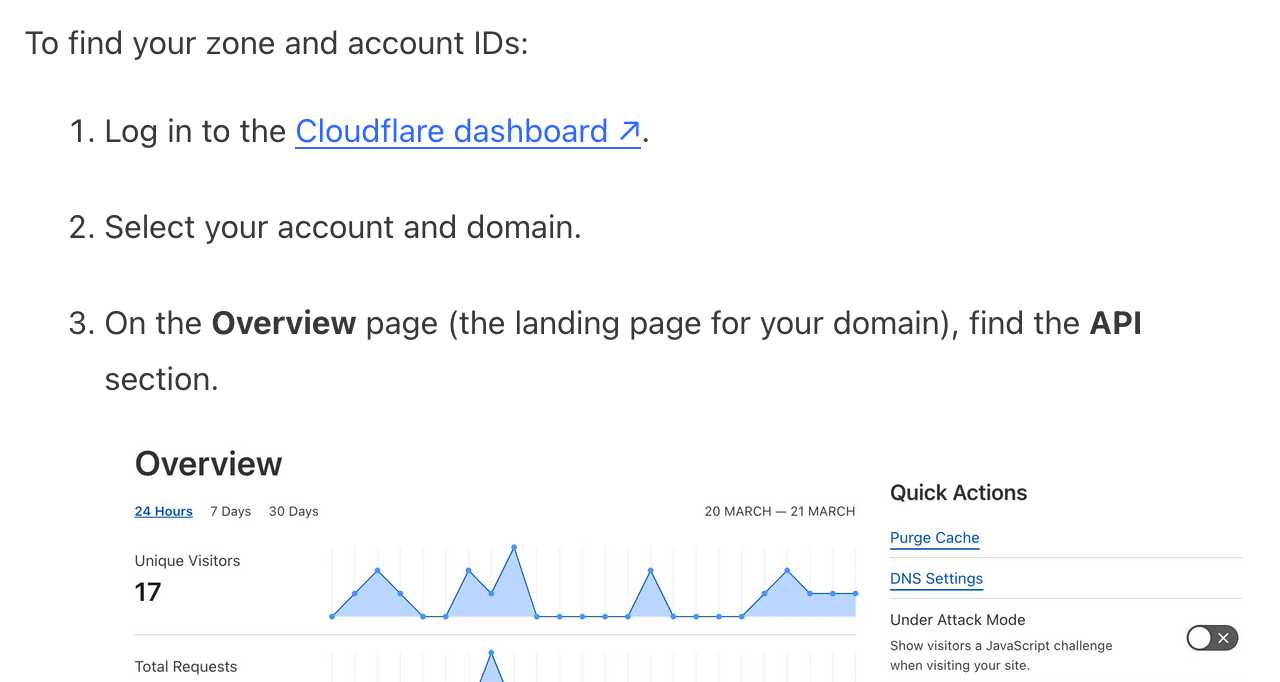
In Cloudflare's case it's harder to link to the correct dashboard page because the URL differs for different users, but that shouldn't be a show-stopper for getting this to work. Set up dash.cloudflare.com/redirects/find-account-id and link to that!
... I just noticed they do have a mechanism like that which they use elsewhere. On the R2 authentication page they link to:
https://dash.cloudflare.com/?to=/:account/r2/api-tokens
The "find account ID" flow presumably can't do the same thing because there is no single page displaying that information - it's shown in a sidebar on the page for each of your Cloudflare domains.