635 posts tagged “llm”
LLM is my command-line tool for running prompts against Large Language Models.
2025
llm-gemini 0.27. New release of my LLM plugin for Google's Gemini models:
- Support for nested schemas in Pydantic, thanks Bill Pugh. #107
- Now tests against Python 3.14.
- Support for YouTube URLs as attachments and the
media_resolutionoption. Thanks, Duane Milne. #112- New model:
gemini-3-pro-preview. #113
The YouTube URL feature is particularly neat, taking advantage of this API feature. I used it against the Google Antigravity launch video:
llm -m gemini-3-pro-preview \
 -a 'https://www.youtube.com/watch?v=nTOVIGsqCuY' \
 'Summary, with detailed notes about what this thing is and how it differs from regular VS Code, then a complete detailed transcript with timestamps'
Here's the result. A spot-check of the timestamps against points in the video shows them to be exactly right.
Trying out Gemini 3 Pro with audio transcription and a new pelican benchmark

Google released Gemini 3 Pro today. Here’s the announcement from Sundar Pichai, Demis Hassabis, and Koray Kavukcuoglu, their developer blog announcement from Logan Kilpatrick, the Gemini 3 Pro Model Card, and their collection of 11 more articles. It’s a big release!
[... 2,476 words]llm-anthropic 0.22.
New release of my llm-anthropic plugin:
- Support for Claude's new structured outputs feature for Sonnet 4.5 and Opus 4.1. #54
- Support for the web search tool using
-o web_search 1- thanks Nick Powell and Ian Langworth. #30
The plugin previously powered LLM schemas using this tool-call based workaround. That code is still used for Anthropic's older models.
I also figured out uv recipes for running the plugin's test suite in an isolated environment, which are now baked into the new Justfile.
Introducing GPT-5.1 for developers. OpenAI announced GPT-5.1 yesterday, calling it a smarter, more conversational ChatGPT. Today they've added it to their API.
We actually got four new models today:
There are a lot of details to absorb here.
GPT-5.1 introduces a new reasoning effort called "none" (previous were minimal, low, medium, and high) - and none is the new default.
This makes the model behave like a non-reasoning model for latency-sensitive use cases, with the high intelligence of GPT‑5.1 and added bonus of performant tool-calling. Relative to GPT‑5 with 'minimal' reasoning, GPT‑5.1 with no reasoning is better at parallel tool calling (which itself increases end-to-end task completion speed), coding tasks, following instructions, and using search tools---and supports web search in our API platform.
When you DO enable thinking you get to benefit from a new feature called "adaptive reasoning":
On straightforward tasks, GPT‑5.1 spends fewer tokens thinking, enabling snappier product experiences and lower token bills. On difficult tasks that require extra thinking, GPT‑5.1 remains persistent, exploring options and checking its work in order to maximize reliability.
Another notable new feature for 5.1 is extended prompt cache retention:
Extended prompt cache retention keeps cached prefixes active for longer, up to a maximum of 24 hours. Extended Prompt Caching works by offloading the key/value tensors to GPU-local storage when memory is full, significantly increasing the storage capacity available for caching.
To enable this set "prompt_cache_retention": "24h" in the API call. Weirdly there's no price increase involved with this at all. I asked about that and OpenAI's Steven Heidel replied:
with 24h prompt caching we move the caches from gpu memory to gpu-local storage. that storage is not free, but we made it free since it moves capacity from a limited resource (GPUs) to a more abundant resource (storage). then we can serve more traffic overall!
The most interesting documentation I've seen so far is in the new 5.1 cookbook, which also includes details of the new shell and apply_patch built-in tools. The apply_patch.py implementation is worth a look, especially if you're interested in the advancing state-of-the-art of file editing tools for LLMs.
I'm still working on integrating the new models into LLM. The Codex models are Responses-API-only.
I got this pelican for GPT-5.1 default (no thinking):

And this one with reasoning effort set to high:

These actually feel like a regression from GPT-5 to me. The bicycles have less spokes!
Kimi K2 Thinking. Chinese AI lab Moonshot's Kimi K2 established itself as one of the largest open weight models - 1 trillion parameters - back in July. They've now released the Thinking version, also a trillion parameters (MoE, 32B active) and also under their custom modified (so not quite open source) MIT license.
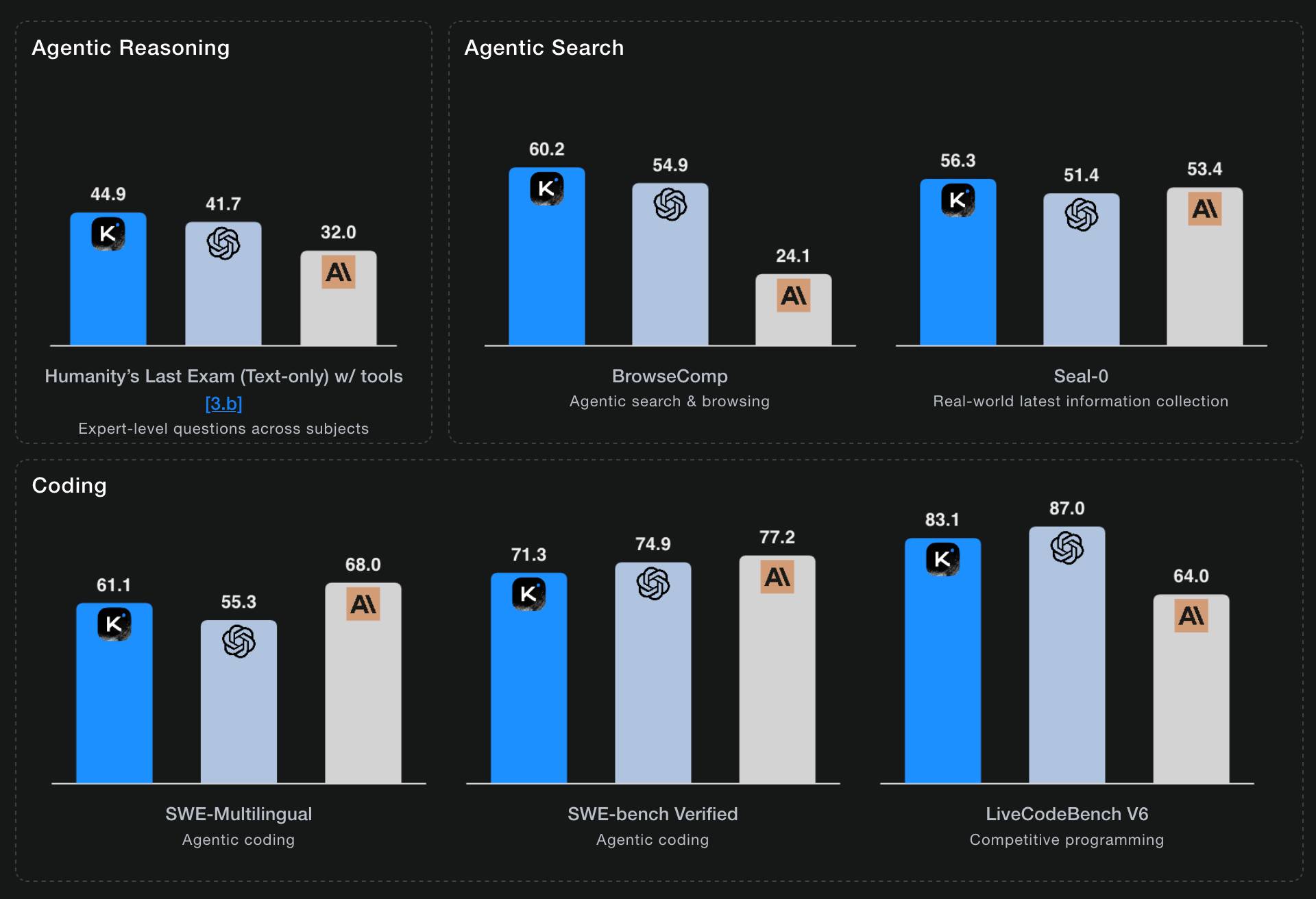
Starting with Kimi K2, we built it as a thinking agent that reasons step-by-step while dynamically invoking tools. It sets a new state-of-the-art on Humanity's Last Exam (HLE), BrowseComp, and other benchmarks by dramatically scaling multi-step reasoning depth and maintaining stable tool-use across 200–300 sequential calls. At the same time, K2 Thinking is a native INT4 quantization model with 256k context window, achieving lossless reductions in inference latency and GPU memory usage.
This one is only 594GB on Hugging Face - Kimi K2 was 1.03TB - which I think is due to the new INT4 quantization. This makes the model both cheaper and faster to host.
So far the only people hosting it are Moonshot themselves. I tried it out both via their own API and via the OpenRouter proxy to it, via the llm-moonshot plugin (by NickMystic) and my llm-openrouter plugin respectively.
The buzz around this model so far is very positive. Could this be the first open weight model that's competitive with the latest from OpenAI and Anthropic, especially for long-running agentic tool call sequences?
Moonshot AI's self-reported benchmark scores show K2 Thinking beating the top OpenAI and Anthropic models (GPT-5 and Sonnet 4.5 Thinking) at "Agentic Reasoning" and "Agentic Search" but not quite top for "Coding":
I ran a couple of pelican tests:
llm install llm-moonshot
llm keys set moonshot # paste key
llm -m moonshot/kimi-k2-thinking 'Generate an SVG of a pelican riding a bicycle'

llm install llm-openrouter
llm keys set openrouter # paste key
llm -m openrouter/moonshotai/kimi-k2-thinking \
  'Generate an SVG of a pelican riding a bicycle'

Artificial Analysis said:
Kimi K2 Thinking achieves 93% in 𝜏²-Bench Telecom, an agentic tool use benchmark where the model acts as a customer service agent. This is the highest score we have independently measured. Tool use in long horizon agentic contexts was a strength of Kimi K2 Instruct and it appears this new Thinking variant makes substantial gains
CNBC quoted a source who provided the training price for the model:
The Kimi K2 Thinking model cost $4.6 million to train, according to a source familiar with the matter. [...] CNBC was unable to independently verify the DeepSeek or Kimi figures.
MLX developer Awni Hannun got it working on two 512GB M3 Ultra Mac Studios:
The new 1 Trillion parameter Kimi K2 Thinking model runs well on 2 M3 Ultras in its native format - no loss in quality!
The model was quantization aware trained (qat) at int4.
Here it generated ~3500 tokens at 15 toks/sec using pipeline-parallelism in mlx-lm
Here's the 658GB mlx-community model.
MiniMax M2 & Agent: Ingenious in Simplicity. MiniMax M2 was released on Monday 27th October by MiniMax, a Chinese AI lab founded in December 2021.
It's a very promising model. Their self-reported benchmark scores show it as comparable to Claude Sonnet 4, and Artificial Analysis are ranking it as the best currently available open weight model according to their intelligence score:
MiniMax’s M2 achieves a new all-time-high Intelligence Index score for an open weights model and offers impressive efficiency with only 10B active parameters (200B total). [...]
The model’s strengths include tool use and instruction following (as shown by Tau2 Bench and IFBench). As such, while M2 likely excels at agentic use cases it may underperform other open weights leaders such as DeepSeek V3.2 and Qwen3 235B at some generalist tasks. This is in line with a number of recent open weights model releases from Chinese AI labs which focus on agentic capabilities, likely pointing to a heavy post-training emphasis on RL.
The size is particularly significant: the model weights are 230GB on Hugging Face, significantly smaller than other high performing open weight models. That's small enough to run on a 256GB Mac Studio, and the MLX community have that working already.
MiniMax offer their own API, and recommend using their Anthropic-compatible endpoint and the official Anthropic SDKs to access it. MiniMax Head of Engineering Skyler Miao provided some background on that:
M2 is a agentic thinking model, it do interleaved thinking like sonnet 4.5, which means every response will contain its thought content. Its very important for M2 to keep the chain of thought. So we must make sure the history thought passed back to the model. Anthropic API support it for sure, as sonnet needs it as well. OpenAI only support it in their new Response API, no support for in ChatCompletion.
MiniMax are offering the new model via their API for free until November 7th, after which the cost will be $0.30/million input tokens and $1.20/million output tokens - similar in price to Gemini 2.5 Flash and GPT-5 Mini, see price comparison here on my llm-prices.com site.
I released a new plugin for LLM called llm-minimax providing support for M2 via the MiniMax API:
llm install llm-minimax
llm keys set minimax
# Paste key here
llm -m m2 -o max_tokens 10000 "Generate an SVG of a pelican riding a bicycle"
Here's the result:

51 input, 4,017 output. At $0.30/m input and $1.20/m output that pelican would cost 0.4836 cents - less than half a cent.
This is the first plugin I've written for an Anthropic-API-compatible model. I released llm-anthropic 0.21 first adding the ability to customize the base_url parameter when using that model class. This meant the new plugin was less than 30 lines of Python.
Introducing Claude Haiku 4.5 (via) Anthropic released Claude Haiku 4.5 today, the cheapest member of the Claude 4.5 family that started with Sonnet 4.5 a couple of weeks ago.
It's priced at $1/million input tokens and $5/million output tokens, slightly more expensive than Haiku 3.5 ($0.80/$4) and a lot more expensive than the original Claude 3 Haiku ($0.25/$1.25), both of which remain available at those prices.
It's a third of the price of Sonnet 4 and Sonnet 4.5 (both $3/$15) which is notable because Anthropic's benchmarks put it in a similar space to that older Sonnet 4 model. As they put it:
What was recently at the frontier is now cheaper and faster. Five months ago, Claude Sonnet 4 was a state-of-the-art model. Today, Claude Haiku 4.5 gives you similar levels of coding performance but at one-third the cost and more than twice the speed.
I've been hoping to see Anthropic release a fast, inexpensive model that's price competitive with the cheapest models from OpenAI and Gemini, currently $0.05/$0.40 (GPT-5-Nano) and $0.075/$0.30 (Gemini 2.0 Flash Lite). Haiku 4.5 certainly isn't that, it looks like they're continuing to focus squarely on the "great at code" part of the market.
The new Haiku is the first Haiku model to support reasoning. It sports a 200,000 token context window, 64,000 maximum output (up from just 8,192 for Haiku 3.5) and a "reliable knowledge cutoff" of February 2025, one month later than the January 2025 date for Sonnet 4 and 4.5 and Opus 4 and 4.1.
Something that caught my eye in the accompanying system card was this note about context length:
For Claude Haiku 4.5, we trained the model to be explicitly context-aware, with precise information about how much context-window has been used. This has two effects: the model learns when and how to wrap up its answer when the limit is approaching, and the model learns to continue reasoning more persistently when the limit is further away. We found this intervention—along with others—to be effective at limiting agentic “laziness” (the phenomenon where models stop working on a problem prematurely, give incomplete answers, or cut corners on tasks).
I've added the new price to llm-prices.com, released llm-anthropic 0.20 with the new model and updated my Haiku-from-your-webcam demo (source) to use Haiku 4.5 as well.
Here's llm -m claude-haiku-4.5 'Generate an SVG of a pelican riding a bicycle' (transcript).

18 input tokens and 1513 output tokens = 0.7583 cents.
Two new models from Chinese AI labs in the past few days. I tried them both out using llm-openrouter:
DeepSeek-V3.2-Exp from DeepSeek. Announcement, Tech Report, Hugging Face (690GB, MIT license).
As an intermediate step toward our next-generation architecture, V3.2-Exp builds upon V3.1-Terminus by introducing DeepSeek Sparse Attention—a sparse attention mechanism designed to explore and validate optimizations for training and inference efficiency in long-context scenarios.
This one felt very slow when I accessed it via OpenRouter - I probably got routed to one of the slower providers. Here's the pelican:

GLM-4.6 from Z.ai. Announcement, Hugging Face (714GB, MIT license).
The context window has been expanded from 128K to 200K tokens [...] higher scores on code benchmarks [...] GLM-4.6 exhibits stronger performance in tool using and search-based agents.
Here's the pelican for that:

Claude Sonnet 4.5 is probably the “best coding model in the world” (at least for now)

Anthropic released Claude Sonnet 4.5 today, with a very bold set of claims:
[... 1,205 words]Improved Gemini 2.5 Flash and Flash-Lite (via) Two new preview models from Google - updates to their fast and inexpensive Flash and Flash Lite families:
The latest version of Gemini 2.5 Flash-Lite was trained and built based on three key themes:
- Better instruction following: The model is significantly better at following complex instructions and system prompts.
- Reduced verbosity: It now produces more concise answers, a key factor in reducing token costs and latency for high-throughput applications (see charts above).
- Stronger multimodal & translation capabilities: This update features more accurate audio transcription, better image understanding, and improved translation quality.
[...]
This latest 2.5 Flash model comes with improvements in two key areas we heard consistent feedback on:
- Better agentic tool use: We've improved how the model uses tools, leading to better performance in more complex, agentic and multi-step applications. This model shows noticeable improvements on key agentic benchmarks, including a 5% gain on SWE-Bench Verified, compared to our last release (48.9% → 54%).
- More efficient: With thinking on, the model is now significantly more cost-efficient—achieving higher quality outputs while using fewer tokens, reducing latency and cost (see charts above).
They also added two new convenience model IDs: gemini-flash-latest and gemini-flash-lite-latest, which will always resolve to the most recent model in that family.
I released llm-gemini 0.26 adding support for the new models and new aliases. I also used the response.set_resolved_model() method added in LLM 0.27 to ensure that the correct model ID would be recorded for those -latest uses.
llm install -U llm-gemini
Both of these models support optional reasoning tokens. I had them draw me pelicans riding bicycles in both thinking and non-thinking mode, using commands that looked like this:
llm -m gemini-2.5-flash-preview-09-2025 -o thinking_budget 4000 "Generate an SVG of a pelican riding a bicycle"
I then got each model to describe the image it had drawn using commands like this:
llm -a https://static.simonwillison.net/static/2025/gemini-2.5-flash-preview-09-2025-thinking.png -m gemini-2.5-flash-preview-09-2025 -o thinking_budget 2000 'Detailed single line alt text for this image'
gemini-2.5-flash-preview-09-2025-thinking

A minimalist stick figure graphic depicts a person with a white oval body and a dot head cycling a gray bicycle, carrying a large, bright yellow rectangular box resting high on their back.
gemini-2.5-flash-preview-09-2025
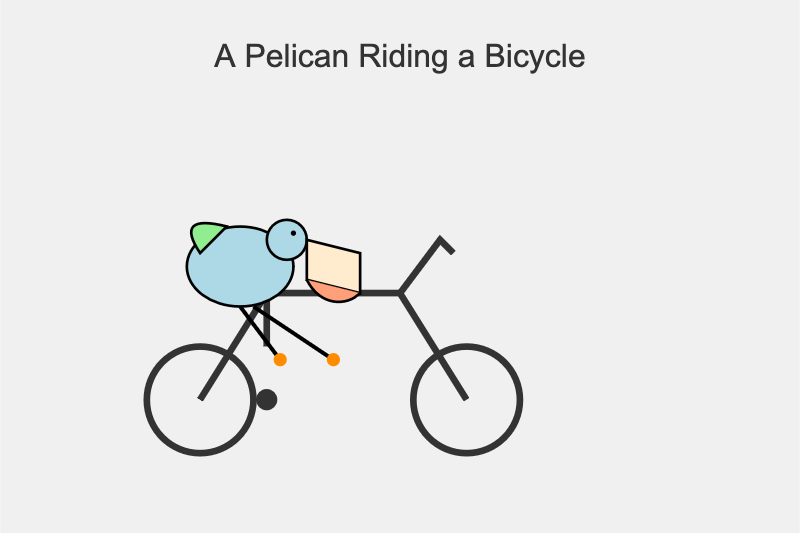
A simple cartoon drawing of a pelican riding a bicycle, with the text "A Pelican Riding a Bicycle" above it.
gemini-2.5-flash-lite-preview-09-2025-thinking

A quirky, simplified cartoon illustration of a white bird with a round body, black eye, and bright yellow beak, sitting astride a dark gray, two-wheeled vehicle with its peach-colored feet dangling below.
gemini-2.5-flash-lite-preview-09-2025

A minimalist, side-profile illustration of a stylized yellow chick or bird character riding a dark-wheeled vehicle on a green strip against a white background.
Artificial Analysis posted a detailed review, including these interesting notes about reasoning efficiency and speed:
- In reasoning mode, Gemini 2.5 Flash and Flash-Lite Preview 09-2025 are more token-efficient, using fewer output tokens than their predecessors to run the Artificial Analysis Intelligence Index. Gemini 2.5 Flash-Lite Preview 09-2025 uses 50% fewer output tokens than its predecessor, while Gemini 2.5 Flash Preview 09-2025 uses 24% fewer output tokens.
- Google Gemini 2.5 Flash-Lite Preview 09-2025 (Reasoning) is ~40% faster than the prior July release, delivering ~887 output tokens/s on Google AI Studio in our API endpoint performance benchmarking. This makes the new Gemini 2.5 Flash-Lite the fastest proprietary model we have benchmarked on the Artificial Analysis website
llm-openrouter 0.5. New release of my LLM plugin for accessing models made available via OpenRouter. The release notes in full:
- Support for tool calling. Thanks, James Sanford. #43
- Support for reasoning options, for example
llm -m openrouter/openai/gpt-5 'prove dogs exist' -o reasoning_effort medium. #45
Tool calling is a really big deal, as it means you can now use the plugin to try out tools (and build agents, if you like) against any of the 179 tool-enabled models on that platform:
llm install llm-openrouter
llm keys set openrouter
# Paste key here
llm models --tools | grep 'OpenRouter:' | wc -l
# Outputs 179
Quite a few of the models hosted on OpenRouter can be accessed for free. Here's a tool-usage example using the llm-tools-datasette plugin against the new Grok 4 Fast model:
llm install llm-tools-datasette
llm -m openrouter/x-ai/grok-4-fast:free -T 'Datasette("https://datasette.io/content")' 'Count available plugins'
Outputs:
There are 154 available plugins.
The output of llm logs -cu shows the tool calls and SQL queries it executed to get that result.
Grok 4 Fast. New hosted vision-enabled reasoning model from xAI that's designed to be fast and extremely competitive on price. It has a 2 million token context window and "was trained end-to-end with tool-use reinforcement learning".
It's priced at $0.20/million input tokens and $0.50/million output tokens - 15x less than Grok 4 (which is $3/million input and $15/million output). That puts it cheaper than GPT-5 mini and Gemini 2.5 Flash on llm-prices.com.
The same model weights handle reasoning and non-reasoning based on a parameter passed to the model.
I've been trying it out via my updated llm-openrouter plugin, since Grok 4 Fast is available for free on OpenRouter for a limited period.
Here's output from the non-reasoning model. This actually output an invalid SVG - I had to make a tiny manual tweak to the XML to get it to render.
llm -m openrouter/x-ai/grok-4-fast:free "Generate an SVG of a pelican riding a bicycle" -o reasoning_enabled false

(I initially ran this without that -o reasoning_enabled false flag, but then I saw that OpenRouter enable reasoning by default for that model. Here's my previous invalid result.)
And the reasoning model:
llm -m openrouter/x-ai/grok-4-fast:free "Generate an SVG of a pelican riding a bicycle" -o reasoning_enabled true

In related news, the New York Times had a story a couple of days ago about Elon's recent focus on xAI: Since Leaving Washington, Elon Musk Has Been All In on His A.I. Company.