12 posts tagged “reverse-engineering”
2026
Direct2D has always been the biggest hurdle for Paint.NET on WINE, and it's clear that it will never be completed enough for Paint.NET's use. And I can't just "disable" the use of Direct2D. So, instead, Paint.NET now has an internal, from-scratch, clean-room reverse-engineered rewrite of Direct2D that it uses on WINE (triggered by using /wine). It lives in PaintDotNet.Windows.Direct2D1.Managed.dll. This was written by our good friend Claude, without whom this would NOT have been possible and would NEVER have happened. [...]
Most of this code is, as they say, "vibe coded." By that I mean that it has not been thoroughly reviewed, it's more "trust me bro" style. I cannot possibly review 180,000 lines of code, it's just way way way too much. For reference, the rest of Paint.NET is about 700,000 lines of code and I've been working on it for over 20 years. [...]
At times, Claude was working with the fury of 10 freshly unshackled Einstein genius-level 10x coders. And other times ... well, not so much. I had to babysit Claude quite a bit to make sure it did resource management correctly (for awhile it just wasn't doing the COM equivalent of AddRef() for reference counted objects, oops). I had to slap it a few times when I found some really bad design or architecture decisions. And I was also impressed at some rather clever and tireless reverse engineering work it did to figure out all the formulas needed for implementing Direct2D's built-in effects library.
— Rick Brewster, author of Paint.NET
I keep hearing anecdotes from people who used coding agents to reverse-engineer and automate devices in their homes.
I think this is an interesting illustration of the impact of the reduced cost of writing code.
Prior to agents, it was entirely possible to reverse-engineer home devices. The problem was the ROI - was it really worth all of that effort? More importantly, any experienced programmer knows that undocumented, unstable APIs like that may well change or break in the future. Is that initial work worth the effort if you're committing yourself to a frustrating cycle of maintenance in the future?
Coding agents change that equation entirely. The effort to get a simple automation working has dropped, as has the cost of trying and failing to get it to work. Since the code is so cheap, the idea of having to maintain it in the future - or throw it away and start again - carries way less psychological baggage.
2025
A new way to extract detailed transcripts from Claude Code
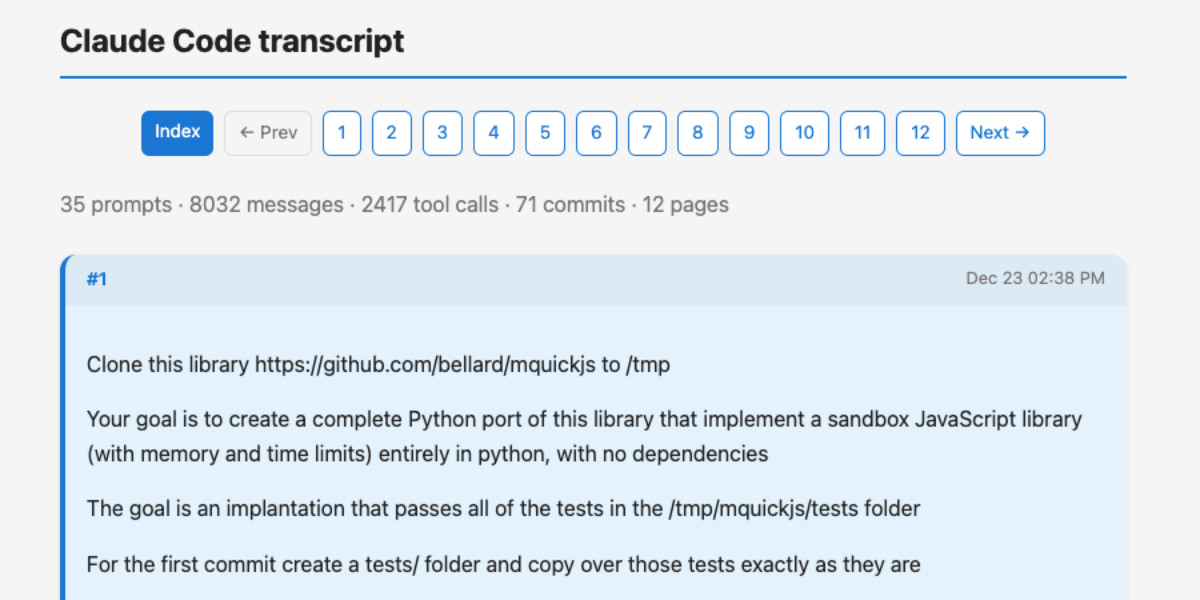
I’ve released claude-code-transcripts, a new Python CLI tool for converting Claude Code transcripts to detailed HTML pages that provide a better interface for understanding what Claude Code has done than even Claude Code itself. The resulting transcripts are also designed to be shared, using any static HTML hosting or even via GitHub Gists.
[... 1,082 words]Reverse engineering Codex CLI to get GPT-5-Codex-Mini to draw me a pelican

OpenAI partially released a new model yesterday called GPT-5-Codex-Mini, which they describe as "a more compact and cost-efficient version of GPT-5-Codex". It’s currently only available via their Codex CLI tool and VS Code extension, with proper API access "coming soon". I decided to use Codex to reverse engineer the Codex CLI tool and give me the ability to prompt the new model directly.
[... 1,774 words]Claude Skills are awesome, maybe a bigger deal than MCP

Anthropic this morning introduced Claude Skills, a new pattern for making new abilities available to their models:
[... 1,864 words]Claude Memory: A Different Philosophy (via) Shlok Khemani has been doing excellent work reverse-engineering LLM systems and documenting his discoveries.
Last week he wrote about ChatGPT memory. This week it's Claude.
Claude's memory system has two fundamental characteristics. First, it starts every conversation with a blank slate, without any preloaded user profiles or conversation history. Memory only activates when you explicitly invoke it. Second, Claude recalls by only referring to your raw conversation history. There are no AI-generated summaries or compressed profiles—just real-time searches through your actual past chats.
Claude's memory is implemented as two new function tools that are made available for a Claude to call. I confirmed this myself with the prompt "Show me a list of tools that you have available to you, duplicating their original names and descriptions" which gave me back these:
conversation_search: Search through past user conversations to find relevant context and information
recent_chats: Retrieve recent chat conversations with customizable sort order (chronological or reverse chronological), optional pagination using 'before' and 'after' datetime filters, and project filtering
The good news here is transparency - Claude's memory feature is implemented as visible tool calls, which means you can see exactly when and how it is accessing previous context.
This helps address my big complaint about ChatGPT memory (see I really don’t like ChatGPT’s new memory dossier back in May) - I like to understand as much as possible about what's going into my context so I can better anticipate how it is likely to affect the model.
The OpenAI system is very different: rather than letting the model decide when to access memory via tools, OpenAI instead automatically include details of previous conversations at the start of every conversation.
Shlok's notes on ChatGPT's memory did include one detail that I had previously missed that I find reassuring:
Recent Conversation Content is a history of your latest conversations with ChatGPT, each timestamped with topic and selected messages. [...] Interestingly, only the user's messages are surfaced, not the assistant's responses.
One of my big worries about memory was that it could harm my "clean slate" approach to chats: if I'm working on code and the model starts going down the wrong path (getting stuck in a bug loop for example) I'll start a fresh chat to wipe that rotten context away. I had worried that ChatGPT memory would bring that bad context along to the next chat, but omitting the LLM responses makes that much less of a risk than I had anticipated.
Update: Here's a slightly confusing twist: yesterday in Bringing memory to teams at work Anthropic revealed an additional memory feature, currently only available to Team and Enterprise accounts, with a feature checkbox labeled "Generate memory of chat history" that looks much more similar to the OpenAI implementation:
With memory, Claude focuses on learning your professional context and work patterns to maximize productivity. It remembers your team’s processes, client needs, project details, and priorities. [...]
Claude uses a memory summary to capture all its memories in one place for you to view and edit. In your settings, you can see exactly what Claude remembers from your conversations, and update the summary at any time by chatting with Claude.
I haven't experienced this feature myself yet as it isn't part of my Claude subscription. I'm glad to hear it's fully transparent and can be edited by the user, resolving another of my complaints about the ChatGPT implementation.
This version of Claude memory also takes Claude Projects into account:
If you use projects, Claude creates a separate memory for each project. This ensures that your product launch planning stays separate from client work, and confidential discussions remain separate from general operations.
I praised OpenAI for adding this a few weeks ago.
Reverse engineering some updates to Claude
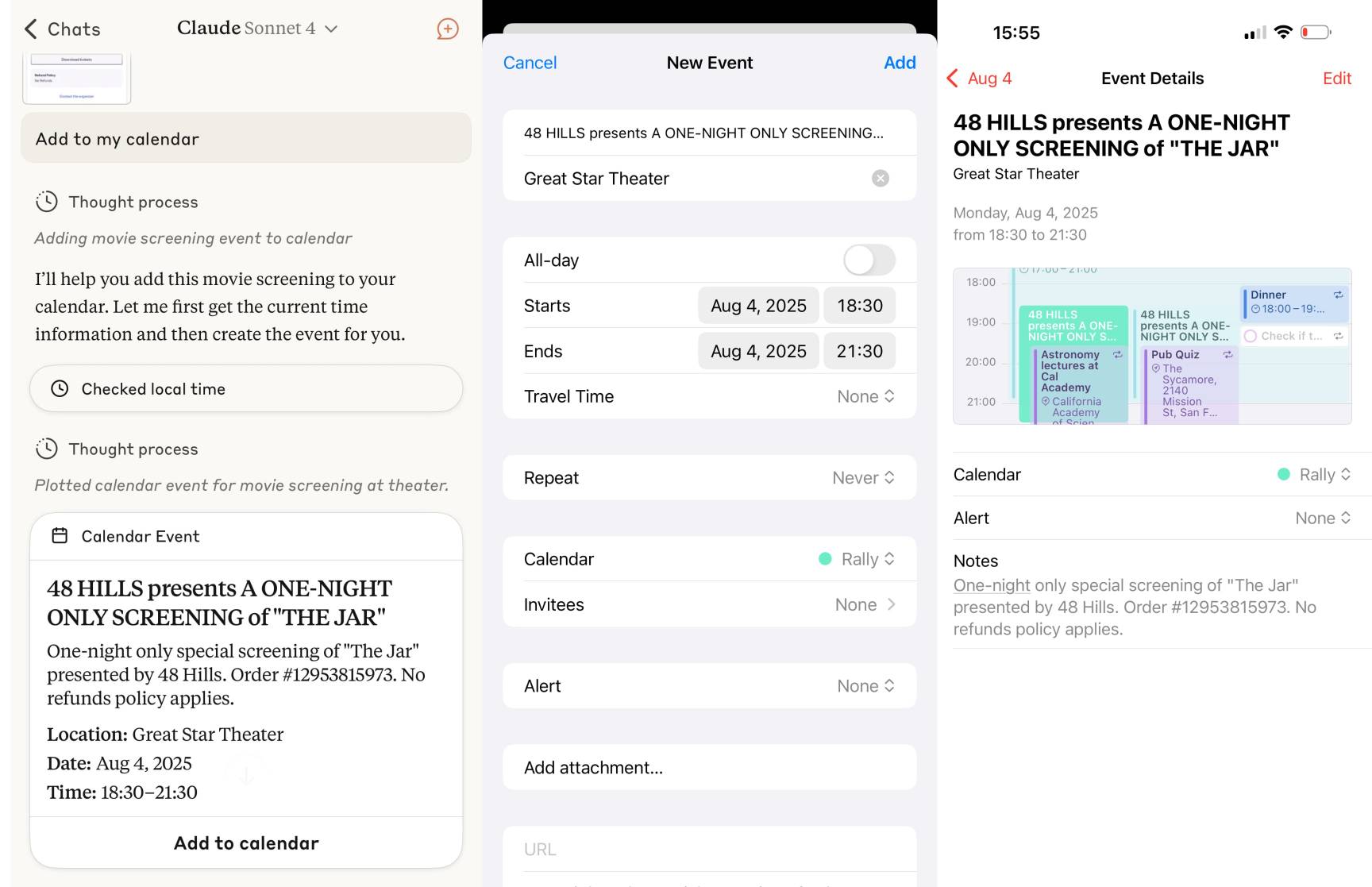
Anthropic released two major new features for their consumer-facing Claude apps in the past couple of days. Sadly, they don’t do a very good job of updating the release notes for those apps—neither of these releases came with any documentation at all beyond short announcements on Twitter. I had to reverse engineer them to figure out what they could do and how they worked!
[... 1,685 words]Using GitHub Spark to reverse engineer GitHub Spark
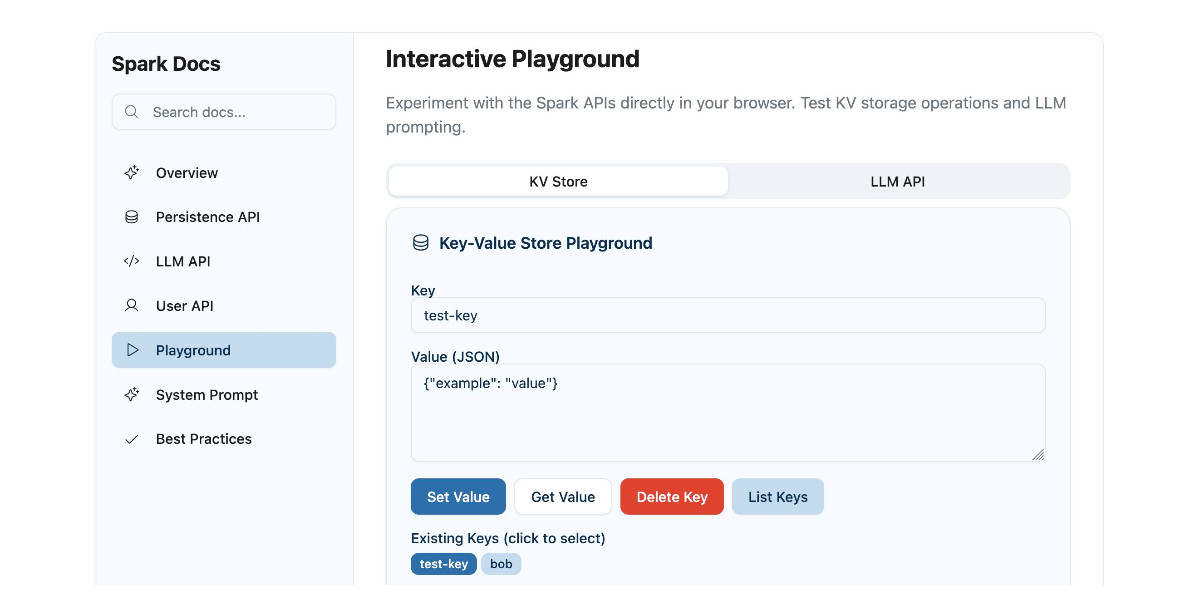
GitHub Spark was released in public preview yesterday. It’s GitHub’s implementation of the prompt-to-app pattern also seen in products like Claude Artifacts, Lovable, Vercel v0, Val Town Townie and Fly.io’s Phoenix New. In this post I reverse engineer Spark and explore its fascinating system prompt in detail.
[... 3,900 words]2022
Reverse Prompt Engineering for Fun and (no) Profit (via) swyx pulls off some impressive prompt leak attacks to reverse engineer the new AI features that just got added to Notion. He concludes that “Prompts are like clientside JavaScript. They are shipped as part of the product, but can be reverse engineered easily, and the meaningful security attack surface area is exactly the same.”
2008
goog/useragent/iphoto.js. The Goog library includes code to detect the user's installed version of iPhoto, based on reverse engineering the Mac.com Gallery RSS feeds. This has Mark Pilgrim written all over it.
Update: Looks like the code is now mirrored here.
If Web authors actually use this feature, and if IE doesn't keep losing market share, then eventually this will cause serious problems for IE's competitors — instead of just having to contend with reverse-engineering IE's quirks mode and making the specs compatible with IE's standards mode, the other browser vendors are going to have to reverse engineer every major IE browser version, and end up implementing these same bug modes themselves.
2005
Dissecting the Google Firefox Toolbar
Google have finally released a Firefox version of the Google Toolbar, with some nice praise for XUL in to the bargain. Of course, the most interesting part of the toolbar from a geeky point of view is the bit that queries Google’s servers for PageRank. Sure enough, if you download the google-toolbar.xpi file, unzip it, then unzip the google-toolbar.jar file within there’s a file called pagerank.js with all of the juicy details.